
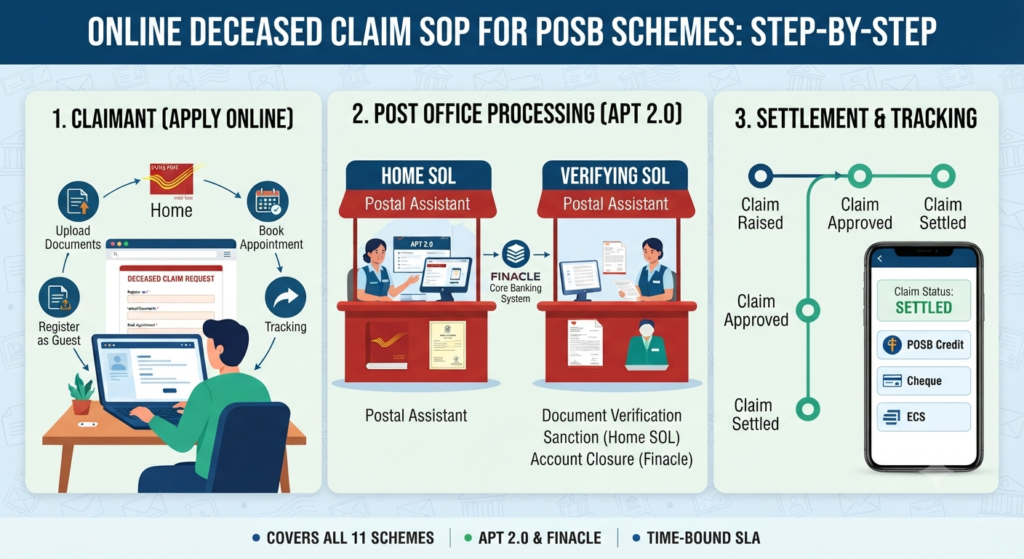
Settling a deceased claim at the post office is now going online! 💻📮
A new Standard Operating Procedure (SOP) has been prepared (document by CEPT) for registering deceased claim requests of Post Office Savings Bank (POSB) schemes through the India Post web portal.
The family member or nominee can now apply from home, upload documents, book a date to show original papers, and track the claim until it is settled. On the office side, everything moves through APT 2.0, with fixed time limits for each step. ⏱️
This SOP matters for counter staff and Postmasters. It is also a likely exam topic for GDS to MTS, GDS to Postman, MTS to PA and Postman to PA aspirants.
Let’s go through it step by step. 👇
📄 SOP at a glance
- Subject: Registering deceased claim requests of POSB schemes online
- Portal for claimants: India Post Customer Self-Service portal (guest login)
- Office application: APT 2.0
- Final closure: In Finacle, then marked CLOSED in APT
- Prepared by: CEPT
- Total pages: 15
🏦 Schemes covered
The online deceased claim facility covers all 11 small savings schemes:
- ✅ Savings Account (SB)
- ✅ Recurring Deposit (RD)
- ✅ Time Deposit (TD)
- ✅ Monthly Income Scheme (MIS)
- ✅ National Savings Certificate (NSC)
- ✅ Kisan Vikas Patra (KVP)
- ✅ Public Provident Fund (PPF)
- ✅ Sukanya Samriddhi Account (SSA)
- ✅ Senior Citizen Savings Scheme (SCSS)
- ✅ Mahila Samman Savings Certificate (MSSC)
- ✅ National Savings Scheme (NSS)
👨👩👧 Part 1: How a claimant registers the claim (with nomination)
- 🌐 Log in as a guest user on the India Post customer self-service portal: app.indiapost.gov.in/customer-selfservice/login
- 🗂️ Select the “Deceased Claim Request” card.
- 🏦 Choose the scheme and enter the Account Number and other details.
- ⚰️ Enter the deceased depositor’s Name, CIF, Date of Birth and Date of Death.
- 👥 Nominee name and nominee percentage are fetched automatically by the system.
- ✍️ Enter each nominee’s relationship, address, mobile number, Aadhaar and PAN.
- More than one nominee? Enter details of all nominees.
- A nominee has died? Enter that nominee’s date of death.
- All nominees have died? Enter details of the legal heir of the last deceased nominee.
- 📎 Upload documents (as applicable):
- Passbook
- Death Certificate
- Claim Form
- Affidavit
- Disclaimer
- Indemnity Bond
- Aadhaar & PAN
- Any other document required
- 💰 Choose how you want the money:
- POSB: Enter your own SB account number
- Cheque
- ECS: Upload a cancelled cheque or the first page of your passbook
- 👀 Preview and confirm. The claim is registered and a Case/Application ID is given.
- 📩 You get an SMS / e-mail after registration.
- 📮 The request goes to the post office where the account stands (Home SOL).
🔁 If something is missing
- If documents are missing or wrong, the Home SOL sends the request back with the reason.
- The claimant uploads the document again, previews it and submits again.
- The request then goes back to the Home SOL.
📜 Part 2: When there is NO nomination
The steps are almost the same, with these differences:
- 👤 Since no nominee is registered, the legal heir’s details are entered.
- 📎 Along with the usual documents, upload the Succession Certificate or Probate of Will (if applicable).
- 🔍 The claimant can track every stage, from Claim Raised to Claim Settled.
🏤 Part 3: Role of the Home SOL (post office where the account stands)
- 💻 The Postmaster logs in to APT 2.0 and checks the claims allotted to the office.
- 👀 Previews the claim and checks the details and uploaded documents against office records and POSB rules.
- ☑️ If everything is correct, ticks the undertaking check box and clicks “Proceed”.
- 📅 The claimant then gets a message to book an appointment at a post office of their choice to show the original documents.
- 🔁 If documents are missing or wrong, the application is reverted with a specific reason.
- ❌ The claim can be rejected if the account number, scheme, nominee, Aadhaar or PAN do not match.
- ✅ After document verification, the claim is either sanctioned (within the office’s financial powers) or sent to the Divisional Office for sanction.
🧾 Part 4: Role of the Document-Verifying SOL (office chosen by the claimant)
- 💻 The Postmaster logs in to APT 2.0 and checks the claims allotted to the office.
- 🤝 When the claimant comes on the appointment date, the original documents are verified.
- 🗣️ The claimant is told that the application will go to the Home SOL for further processing.
- ☑️ If everything is correct, tick the undertaking check box and click “Submit”.
- ✅ Then click “Confirm Approval” to confirm physical verification.
- 🔁 The application can be reverted or rejected if account number, scheme, nominee, Aadhaar or PAN do not match.
- 📦 The verifying office collects all documents and sends them to the Home SOL by Service Insured Post.
🏢 Part 5: Role of the Sanctioning Office (PO or Divisional Office)
- 💻 The officer logs in to APT and checks the claims allotted.
- 🔍 Checks the details, uploaded documents and claim amount.
- ✅ If correct, approves it and sends it back to the post office with a sanction letter.
- 🔁 If needed, reverts it with a reason.
- ➡️ If it has to go to the DO, it is forwarded.
🔒 Part 6: Final closure of the claim
- 🖥️ After approval, the account is closed in Finacle.
- 💸 Money is paid as per the claimant’s chosen mode (POSB / Cheque / ECS).
- 🏷️ The claim is then updated as CLOSED in APT.
⏱️ Time limits (SLA) for online deceased claim settlement
“T” = date of receipt at the SOL / DO
| Stage | Time limit |
|---|---|
| Home SOL: preliminary check of uploaded documents after online receipt | 2 working days (T+2) |
| Verifying SOL: document verification and sending the case online to Home SOL | 1 working day (same day) |
| Home SOL: settlement of nomination cases | 1 working day (T+1) |
| Home SOL: settlement of non-nomination cases (within its financial powers) | 6 working days (T+6) |
| Home SOL: sending cases beyond its financial powers to DO | 1 working day (T+1) |
| DO: examine and issue sanction | 6 working days (T+6) |
| DO: send sanction to SOL for payment (copy to claimant) | 1 working day (T+1) |
👥 Who is responsible for what?
🏤 Home SOL (where the account stands):
- Checks the online application and documents against account records and POSB rules
- Sanctions claims within its financial powers
- Gets sanction from the DO for bigger claims
- Makes sure of account closure, payment and status update in APT
🧾 Document-Verifying SOL (office chosen by the claimant):
- Matches original documents with the uploaded ones
- Confirms physical verification in APT
- Sends all documents to the Home SOL by Service Insured Post
📊 MIS reports and monitoring
- 📈 Reports on received, disposed and pending claims can be generated in APT.
- 🏛️ These are available at Divisional, Regional and Circle levels.
- 🗓️ Reports are to be reviewed every fortnight so pending cases are followed up with the SOLs.
🎯 Why this is important for departmental exams
Deceased claims are a favourite topic in the POSB section of the GDS to MTS Syllabus, GDS to Postman Syllabus, MTS to PA Syllabus and Postman to PA Syllabus. Questions from new SOPs often show up in exams.
Points to remember: 📝
- 🔢 11 schemes are covered.
- 🌐 Claimants apply as a guest user on the customer self-service portal.
- 💻 Office work happens in APT 2.0; closure happens in Finacle.
- ⏱️ T+2 for the Home SOL’s first check; T+1 for nomination case settlement; T+6 for non-nomination cases and DO sanction.
- 📦 Original documents go to the Home SOL by Service Insured Post.
- 📊 MIS reports are reviewed fortnightly.
💡 Tip: Revise this together with Chapter 19 (Settlement of Deceased Claim Cases) of the POSB (CBS) Manual 2026. Then practise with a GDS to MTS Mock Test or an India Post Quiz on POSB.
❓ FAQs
Q1. Can a deceased claim for a post office account be filed online? Yes. The claimant logs in as a guest user on the India Post customer self-service portal and selects “Deceased Claim Request”.
Q2. Which schemes are covered? SB, RD, TD, MIS, NSC, KVP, PPF, SSA, SCSS, MSSC and NSS.
Q3. Do I still need to visit the post office? Yes, once. After the Home SOL checks your online claim, you book an appointment at a post office of your choice to show the original documents.
Q4. What if there is no nominee? The legal heir’s details are entered. A Succession Certificate or Probate of Will may also be needed, as applicable.
Q5. How will I receive the money? You can choose POSB (into your SB account), Cheque or ECS.
Q6. How long does a nomination claim take? The Home SOL has to settle nomination cases within 1 working day after online receipt (T+1), after document verification.
Q7. Can I track my claim? Yes. You can track it from Claim Raised to Claim Settled.