
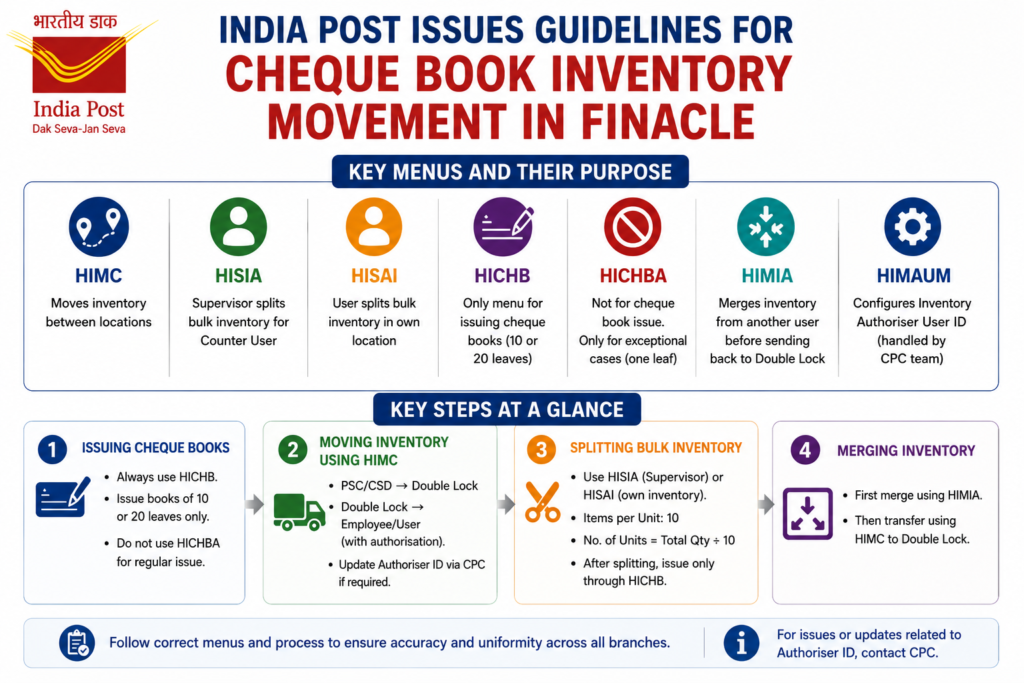
The CEPT CBS Team, working under CPC Bihar Circle, has issued a fresh set of guidelines. These guidelines are for cheque book inventory movement and issue in Finacle. The goal is simple: stop wrong practices and bring one uniform procedure across all branches. Here is a short and simple summary.
Why These Guidelines Were Issued
Several emails were being received about basic cheque book inventory activities in Finacle. To reduce errors and confusion, the CEPT CBS Team has now listed clear rules for each menu used in this process.
Key Menus and Their Purpose
- HIMC: Moves inventory between locations, such as PSC/CSD to Double Lock, and Double Lock to Counter User.
- HISIA: Used by a Supervisor to split bulk cheque inventory available with a Counter User.
- HISAI: Used by a user to split bulk inventory available in their own location.
- HICHB: The only authorized menu for issuing cheque books, limited to 10 or 20 leaves.
- HICHBA: Should not be used for cheque book issue. It is only for exceptional CTS refer-to-branch cases, and issues just one cheque leaf.
- HIMIA: Merges inventory from another user’s location before it is transferred back to Double Lock.
- HIMAUM: Used to configure the Inventory Authoriser User ID. This is handled by the CPC team.
Simple Steps for Common Tasks
Issuing Cheque Books
- Always use HICHB. This menu only permits issuing books of 10 or 20 leaves, which prevents bulk issue to a single account.
- Never use HICHBA for regular cheque book issue.
Moving Inventory Using HIMC
- Step 1: After receiving stock from PSC or CSD, move it from the PSC/CSD location to the Double Lock location. Complete this using the Authorise tab and entering Authoriser credentials.
- Step 2: On getting a requisition from the Counter PA, move inventory from Double Lock to the Employee or User location, again completing authorisation.
- If the configured Authoriser has been transferred, is not working in that SOL, or is unavailable, cancel the movement in HIMC, request CPC to update the Authoriser ID, and then start the movement again.
Splitting Bulk Inventory
- Use HISIA if you are a Supervisor splitting inventory for a Counter User, or HISAI if you are splitting your own inventory.
- Check the available quantity first.
- Enter Items per Unit as 10, and calculate Number of Units as Total Quantity divided by 10.
- After splitting, issue cheque books only through HICHB.
Merging Inventory
- When an employee’s inventory needs to go back to Double Lock, due to transfer, retirement, or long leave, first merge it using HIMIA.
- After merging, transfer the inventory using HIMC from the Employee location to the Double Lock location.
Final Thoughts
These guidelines are meant to bring consistency and reduce mistakes in cheque book handling across India Post branches. Following the correct menu for each step, especially using HICHB only for issuing cheque books, helps avoid errors and keeps the process smooth for both staff and customers.